Free TikTok Video Downloader
Download TikTok Videos Without Watermark
Paste any TikTok link below. Get clean MP4 in seconds — no watermark, no sign-up.
Recent Downloads
No recent downloads yet
The #1 TikTok Video Downloader Without Watermark
Tired of TikTok's watermark on every downloaded video? ClipSave fetches TikTok videos in their original quality—without the watermark or logo overlay. Paste a TikTok link from tiktok.com, vm.tiktok.com, or vt.tiktok.com, and we'll give you a clean MP4 file.
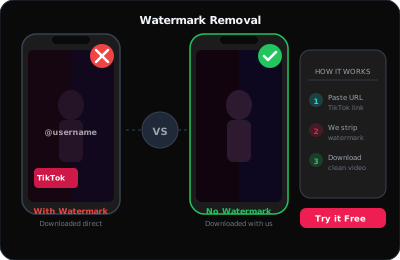
TikTok's built-in download feature adds a watermark to every video. That's fine for quick shares, but for saving favorites, creating compilations, or offline viewing, you want a clean file. Our TikTok downloader pulls the source video directly, so you get the same quality as the original upload—with no branding.
Whether you're saving dance tutorials, comedy skits, music clips, or educational content, ClipSave makes it simple. No app install, no account required. Just paste, fetch, and download.
The TikTok app's download feature always adds a watermark. Third-party TikTok downloaders often do the same. ClipSave is different: we retrieve the original video file, so you get a clean MP4 with no logos or branding. Perfect for creators who want to repost their content elsewhere or fans who want a pristine copy.
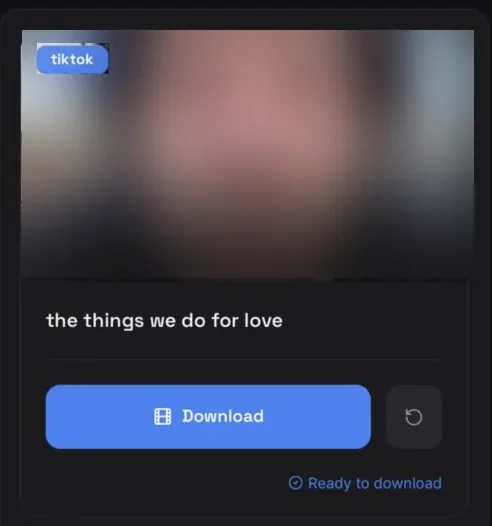
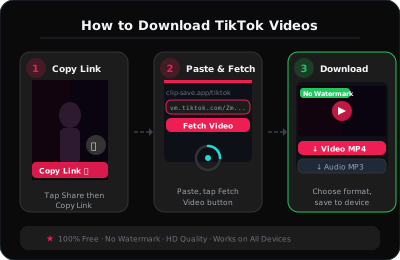
How to Save TikTok Videos in 3 Steps
Step 1: Open the TikTok app or website and find the video you want. Tap the share button and copy the link. TikTok links can look like tiktok.com/@user/video/123 or vm.tiktok.com/xxxxx.
Step 2: Paste the link into the ClipSave box above. Click Fetch. We'll detect the video and show you the available quality.
Step 3: Choose your quality (if multiple options exist) and click Download. The MP4 file will save to your device. On mobile, it typically goes to your downloads folder or Photos app.
That's it. No watermarks, no complicated steps. Our TikTok video saver works with public videos only—private or region-locked content won't be available.

Why Download TikTok Videos Without Watermark?
Creators often want to repost their own TikToks elsewhere without the watermark. Educators save clips for presentations. Fans archive viral moments. Musicians save covers and duets. A watermark-free download gives you a clean file for any use.
ClipSave respects copyright. We provide a tool; you're responsible for using it legally. Download only content you own, have permission to use, or that is clearly free to save — a public video is not the same as a licence to republish it.
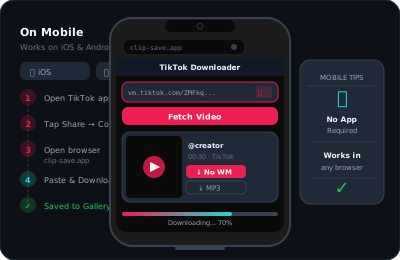
TikTok Downloader That Works on Any Device
ClipSave works on iPhone, Android, and desktop. No need to install a separate TikTok downloader app—our web version works in any browser. Paste your link on your phone or computer and get the same fast, watermark-free results.
We support all TikTok link formats: full URLs, short vm.tiktok.com links, and vt.tiktok.com. If TikTok changes their URL structure, we update our service to keep downloads working.
Visit our blog for detailed guides on saving TikTok without watermark, comparing downloaders vs screen recording, and tips for offline viewing.
Duets, Stitches and Slideshows
A Duet or a Stitch downloads as the combined video TikTok shows — the finished frame with both halves in it. The separate source clips are not stored as separate files, so no tool can split them apart afterwards.
Photo slideshow posts behave differently again: TikTok assembles them from still images plus a music track at playback time. What downloads is the video TikTok renders from that, not the individual photos.
Videos with licensed music sometimes carry a different audio track outside the app for rights reasons. If the audio matters, check the file after downloading.
When a TikTok Will Not Download
The account is private, or the video is set to friends-only. TikTok serves those files only to an authenticated session that is allowed to see them, and ClipSave never asks for your TikTok login.
The video was deleted or removed for a policy violation after the link was shared.
The video is region-locked and unavailable from our servers' location, even though it plays for you.
The link points at a profile or a sound page rather than a video. Check that the address contains /video/ or is a vm.tiktok.com share link, and copy it again from Share → Copy link if a fetch fails.
TikTok Downloader — Frequently Asked Questions
- How do I download a TikTok video without watermark?
- Copy the TikTok link (from tiktok.com, vm.tiktok.com, or vt.tiktok.com), paste it into ClipSave, click Fetch, then Download. We serve a clean MP4 without the TikTok watermark when the source allows it.
- Does ClipSave work on iPhone and Android?
- Yes. Open ClipSave in Safari, Chrome, or any mobile browser, paste your link, and download. No app install is required on our side.
- Why does TikTok add a watermark when I save in the app?
- TikTok’s built-in save adds branding. ClipSave retrieves the video file for public links so you can get a watermark-free MP4 for allowed use cases.
- Can I download private TikTok videos?
- No. Only publicly accessible videos can be fetched. Private, restricted, or region-locked content will not be available.
- What format do I get?
- Downloads are typically MP4, which plays on phones, tablets, and desktops without extra software.
- Do I need an account to use ClipSave?
- No sign-up is required. Paste your link, fetch, and download — free to use.
- Does ClipSave store my videos?
- Files are streamed to your device. We do not host your downloads for others to access.
- What if Fetch fails?
- The link may be invalid, the video may be removed, or TikTok may be temporarily unreachable. Try copying the link again from Share → Copy link.
Learn More
Explore our blog for guides, tips, and tutorials.
View all blog posts →Every TikTok downloader
Need one specific format? Each of these is tuned for a single kind of TikTok post.
Download from other platforms
Same fast, free downloader. No sign-up, no watermark.
- YouTube (Free YouTube Video Downloader)
- Instagram (Free Instagram Video Downloader)
- Twitter (Free Twitter Video Downloader)
- Facebook (Free Facebook Video Downloader)
- Dailymotion (Free Dailymotion Video Downloader)
- Vimeo (Free Vimeo Video Downloader)
- LinkedIn (Free LinkedIn Video Downloader)
- Telegram (Free Telegram Video Downloader)
- SoundCloud (Free SoundCloud Downloader)