Free SoundCloud Downloader
Download SoundCloud Tracks as MP3
Paste any public SoundCloud link below. We fetch the audio stream so you can save an MP3 — free, in your browser.
Recent Downloads
No recent downloads yet
Free SoundCloud Downloader
SoundCloud is where a great deal of music lives before it reaches anywhere else: DJ sets that run for two hours, demos, remixes, podcast episodes, field recordings and back catalogues that never made it onto the big streaming services. It is also a platform people listen to on the move, which is exactly when a phone drops to one bar of signal.
ClipSave resolves a public SoundCloud link in the browser and hands you the audio as an MP3. Copy the track's address from SoundCloud, paste it into the field above, press Fetch, and you get the title, the artist, the artwork and the length so you can check you have the right track before you save anything.
There is no desktop app to install, no browser extension and no ClipSave account. The tool is free to use: after three fetches it asks you to answer one small sum, then you get three more, which is how automated scraping is kept off the service without making everyone sign up.
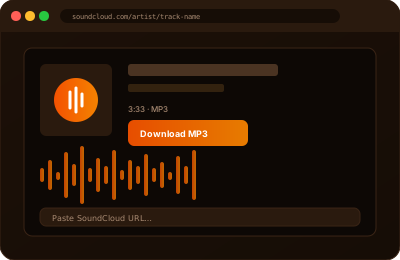
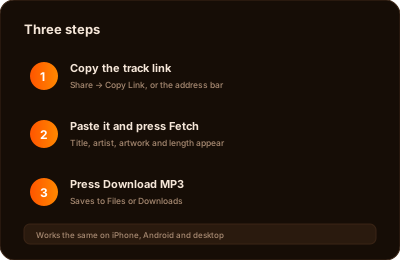
How to Download a SoundCloud Track as MP3
Step 1 — Copy the link. On the web, open the track and copy the address bar: it looks like soundcloud.com/artist-name/track-name. In the mobile app, tap Share, then Copy Link, which usually gives you a shortened on.soundcloud.com address. Both work here.
Step 2 — Paste it into the field above and press Fetch. We request the track's metadata and its audio stream, which takes a couple of seconds on a normal connection.
Step 3 — Check the preview, then press Download MP3. The file saves through your browser like any other download: the Files app or Downloads folder on a phone, the Downloads folder on a laptop.
The sequence is identical on iPhone, Android, Windows, macOS and Linux, because all of the work happens on our side and the browser only receives a finished file.
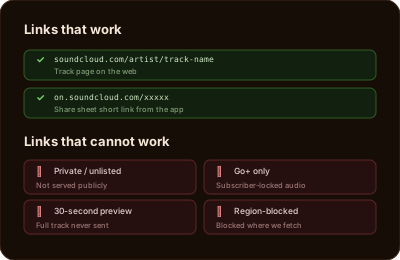
Which SoundCloud Links Work
Standard track pages (soundcloud.com/artist/track) and the app's share links (on.soundcloud.com/xxxxx) both resolve. A link that carries extra tracking parameters after a question mark is fine — copying the plain address is simply tidier.
What cannot be fetched is anything the platform does not serve publicly. Private and unlisted uploads, tracks locked behind SoundCloud Go+, previews that only play 30 seconds, uploads geo-blocked in our servers' region, and anything the artist has since deleted will all fail. When that happens the tool reports that it could not find the track's data rather than guessing.
The quickest way to tell the difference between a broken link and a restricted track is to open it in a logged-out browser tab. If it will not play there, no downloader can reach it either — the audio is simply not being served to the public.
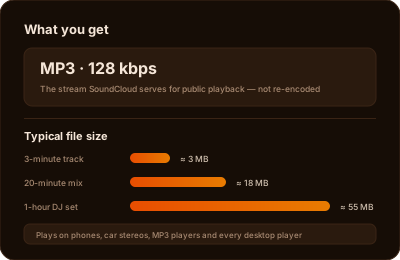
MP3 Quality, File Size and Playlists
Downloads are MP3 at 128 kbps, because that is the stream SoundCloud serves for public playback. Anything claiming to hand you a 320 kbps file from a public SoundCloud link is either re-encoding the same 128 kbps audio — which adds nothing but file size — or pulling from a source that is not the public stream. We do not re-encode, so what you save is what the platform sent.
In practice a three-minute track is roughly 3 MB and an hour-long DJ set around 55 MB, which matters if you are on a metered connection. MP3 plays everywhere without extra codecs: phones, car head units, older MP3 players, and every desktop player and editor worth using.
One track is fetched per link. Paste a playlist or profile address and you will need to open the individual tracks you want, since there is no batch or whole-profile download here.
Artists, Copyright and the Official Download Button
Most of what is uploaded to SoundCloud is somebody's copyrighted work, and a downloader does not change that. Saving a track to listen to offline, on a commute or a flight, is the ordinary private use people have always made of recordings. Re-uploading it, putting it in a video, playing it in a venue or selling it is a different matter entirely, and it needs the rights holder's permission.
Plenty of artists enable SoundCloud's own Download button on tracks they want shared, and some link a free download from the track description. Where that button exists, use it: the artist chose to offer the file, the download is counted for them, and you often get a better-quality file than the public stream.
If you hold the rights to something on this site and want it removed, our DMCA page explains how to send a notice and what happens next. Our copyright policy covers what is and is not acceptable use of the tools.
SoundCloud Downloader — Frequently Asked Questions
- How do I download a song from SoundCloud?
- Copy the track's link from SoundCloud — either the soundcloud.com/artist/track address or the on.soundcloud.com share link — paste it into ClipSave, press Fetch, then press Download MP3 once the preview appears.
- What quality are the MP3 files?
- 128 kbps MP3, which is the audio SoundCloud serves for public playback. We do not re-encode it, and no tool can create detail that the source stream does not contain, so treat any promise of 320 kbps from a public link with suspicion.
- Why does a track fail to download?
- Because it is not publicly streamable. Private or unlisted uploads, Go+ subscriber-only tracks, 30-second previews, region-blocked uploads and deleted tracks all fail. Open the link in a logged-out browser tab — if it will not play there, it cannot be fetched here.
- Can I download a whole SoundCloud playlist or profile at once?
- No. One link gives you one track, so you would need to fetch each track you want individually. There is no batch download or profile archiving on this site.
- Do I need an account or an app?
- Neither. It runs in your browser with no ClipSave account and nothing to install. Three fetches are free, then one short arithmetic question unlocks three more.
- Is it legal to download SoundCloud tracks?
- Keeping a copy of a publicly streamable track for your own offline listening is normal private use. Redistributing it, using it in your own uploads or using it commercially without the rights holder's permission is not, and no downloader makes that lawful.
- Should I use the artist's own download button instead?
- Yes, whenever it is there. If a track shows SoundCloud's Download button, the artist has chosen to give the file away — it is counted for them and is often a better-quality file than the public stream.
Learn More
Explore our blog for guides, tips, and tutorials.
- YouTube to MP3: what is free and safe in 2026
- Best free video downloaders in 2026
- Free YouTube video downloader
- Free browser video editor