Free Dailymotion Video Downloader
Download Dailymotion Videos in Seconds
Paste any Dailymotion link below. We fetch the stream so you can save MP4 — free, in your browser.
Recent Downloads
No recent downloads yet
Free Dailymotion Video Downloader
Dailymotion carries news bulletins, football highlights, music, documentaries and a large amount of regional content that never appears on other platforms — which is exactly why people want an offline copy before a flight, a commute, or a spell of bad signal.
ClipSave handles it in the browser. Copy the video's address from Dailymotion, including the short dai.ly links the share menu produces, paste it above and press Fetch. We request the metadata and a downloadable stream, show you a preview, and let you save an MP4 when you are ready.
No desktop app, no browser extension, no ClipSave account. Download only what you have the right to keep, and respect Dailymotion's terms and the uploader's rights.
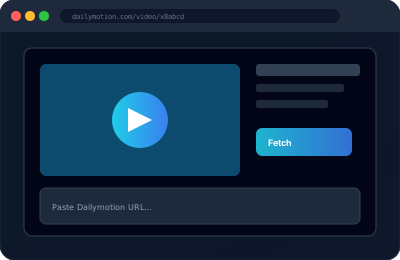
How to Download a Dailymotion Video
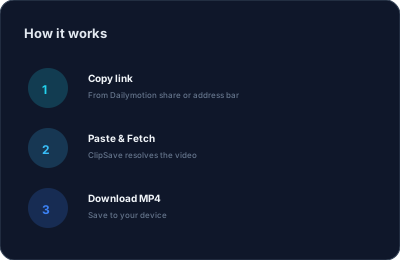
Step 1 — Copy the link. On desktop, copy the address bar on the watch page: https://www.dailymotion.com/video/x7tgad0. In the mobile app, use Share, then Copy Link, which usually gives you a dai.ly short link.
Step 2 — Paste it into the field above and press Fetch.
Step 3 — Review the preview so you know you have the right video, choose a quality if several are offered, and press Download.
The whole sequence takes a few seconds on a normal connection, and it is the same on a phone as on a laptop.
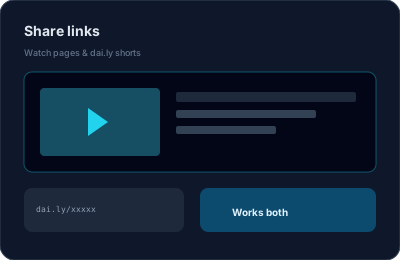
Works with dailymotion.com and dai.ly Links
Standard watch pages use dailymotion.com/video/VIDEO_ID. Share menus and the mobile apps produce shortened dai.ly/VIDEO_ID links. Both resolve here, as do links that carry a playlist or channel prefix before the video ID.
Embedded players (dailymotion.com/embed/video/ID) also work, which is useful when a video is embedded in a news article rather than linked directly.
Videos that are private, age-restricted behind a login, geo-blocked in our servers' region, or deleted cannot be fetched. If the page will not play for you in a logged-out browser tab, it will not resolve here either.
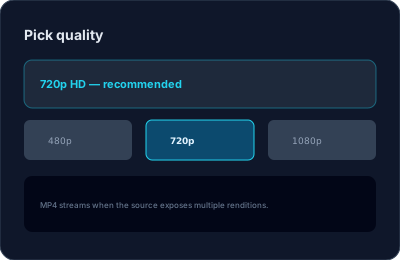
Quality and Format
Available resolutions depend on how the uploader encoded the video. Dailymotion commonly exposes 240p through 1080p; when several renditions are available, ClipSave lists them so you can trade file size against sharpness.
Downloads are MP4, which plays on phones, tablets, smart TVs and desktops without extra codecs, and imports into any mainstream editor.
We do not re-encode the file. What you get is the stream Dailymotion serves, so nothing is lost in a second compression pass.
Troubleshooting and Responsible Use
If Fetch fails, check the link in a logged-out browser tab first — that rules out the common causes of a private, removed or region-locked video in one step. Copying the address from the watch page rather than a search result also avoids tracking parameters that can confuse resolution.
ClipSave is free and needs no sign-up, and we do not keep a library of your downloads; each link is resolved on demand.
Save content for personal offline viewing, research or archiving. Redistributing someone else's video, or using it commercially without permission, is not something any downloader makes lawful.
Dailymotion Downloader — Frequently Asked Questions
- How do I download a Dailymotion video?
- Copy the video URL from Dailymotion (including short dai.ly links), paste it into ClipSave, click Fetch, choose a quality if multiple are shown, then Download.
- What format are downloads?
- Files are usually MP4 for easy playback on all major devices.
- Do I need to install software?
- No. ClipSave runs in your browser — no desktop app or extension required.
- Why are quality options different per video?
- Available resolutions depend on what Dailymotion provides for each upload.
- Can I download any Dailymotion video?
- Only public videos you are allowed to save. Respect copyright and Dailymotion’s terms.
- Is ClipSave free?
- Yes. Paste, fetch, and download without signing up for ClipSave.
- Does ClipSave keep a copy of my file?
- Processing is on-demand; we focus on getting the file to your device rather than storing it for you.
Learn More
Explore our blog for guides, tips, and tutorials.
View all blog posts →More free tools
Subtitles, thumbnails, short links and quick edits. Free, in the browser, no sign-up.
Video downloaders
Same fast, free downloader. No sign-up, no watermark.
- YouTube (Free YouTube Video Downloader)
- Instagram (Free Instagram Video Downloader)
- TikTok (Free TikTok Video Downloader)
- Twitter (Free Twitter Video Downloader)
- Facebook (Free Facebook Video Downloader)
- Vimeo (Free Vimeo Video Downloader)
- LinkedIn (Free LinkedIn Video Downloader)
- Telegram (Free Telegram Video Downloader)
- SoundCloud (Free SoundCloud Downloader)