TikTok Reels Downloader
Download TikTok Videos Without Watermark
Paste any TikTok link below. Get clean MP4 in seconds — no watermark, no sign-up.
Downloading any copyrighted materials is strictly prohibited, please read our Terms of Service.
Recent Downloads
No recent downloads yet
The #1 TikTok Video Downloader Without Watermark
Tired of TikTok's watermark on every downloaded video? ClipSave fetches TikTok videos in their original quality—without the watermark or logo overlay. Paste a TikTok link from tiktok.com, vm.tiktok.com, or vt.tiktok.com, and we'll give you a clean MP4 file.
TikTok's built-in download feature adds a watermark to every video. That's fine for quick shares, but for saving favorites, creating compilations, or offline viewing, you want a clean file. Our TikTok downloader pulls the source video directly, so you get the same quality as the original upload—with no branding.
Whether you're saving dance tutorials, comedy skits, music clips, or educational content, ClipSave makes it simple. No app install, no account required. Just paste, fetch, and download.
The TikTok app's download feature always adds a watermark. Third-party TikTok downloaders often do the same. ClipSave is different: we retrieve the original video file, so you get a clean MP4 with no logos or branding. Perfect for creators who want to repost their content elsewhere or fans who want a pristine copy.

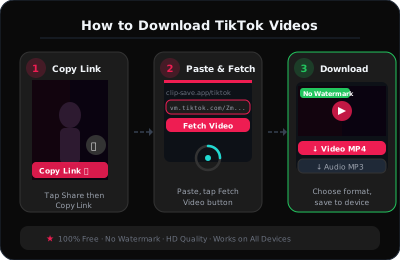
How to Save TikTok Videos in 3 Steps
Step 1: Open the TikTok app or website and find the video you want. Tap the share button and copy the link. TikTok links can look like tiktok.com/@user/video/123 or vm.tiktok.com/xxxxx.
Step 2: Paste the link into the ClipSave box above. Click Fetch. We'll detect the video and show you the available quality.
Step 3: Choose your quality (if multiple options exist) and click Download. The MP4 file will save to your device. On mobile, it typically goes to your downloads folder or Photos app.
That's it. No watermarks, no complicated steps. Our TikTok video saver works with public videos only—private or region-locked content won't be available.
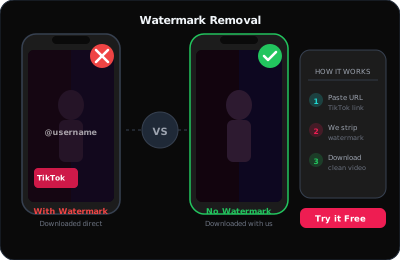
Why Download TikTok Videos Without Watermark?
Creators often want to repost their own TikToks elsewhere without the watermark. Educators save clips for presentations. Fans archive viral moments. Musicians save covers and duets. A watermark-free download gives you a clean file for any use.
ClipSave respects copyright. We provide a tool; you're responsible for using it legally. Download only content you own, have permission to use, or that's in the public domain. For personal, offline viewing of public videos, our TikTok downloader is the go-to choice for millions.
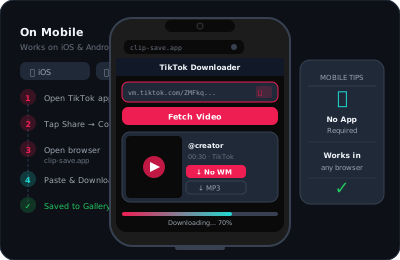
TikTok Downloader That Works on Any Device
ClipSave works on iPhone, Android, and desktop. No need to install a separate TikTok downloader app—our web version works in any browser. Paste your link on your phone or computer and get the same fast, watermark-free results.
We support all TikTok link formats: full URLs, short vm.tiktok.com links, and vt.tiktok.com. If TikTok changes their URL structure, we update our service to keep downloads working.
Visit our blog for detailed guides on saving TikTok without watermark, comparing downloaders vs screen recording, and tips for offline viewing.
Learn More
Explore our blog for guides, tips, and tutorials.